Here is the updated article with the requested internal link naturally integrated into Reason 6: Your Content Is Too Generic, using relevant anchor text (generic AI-generated content):
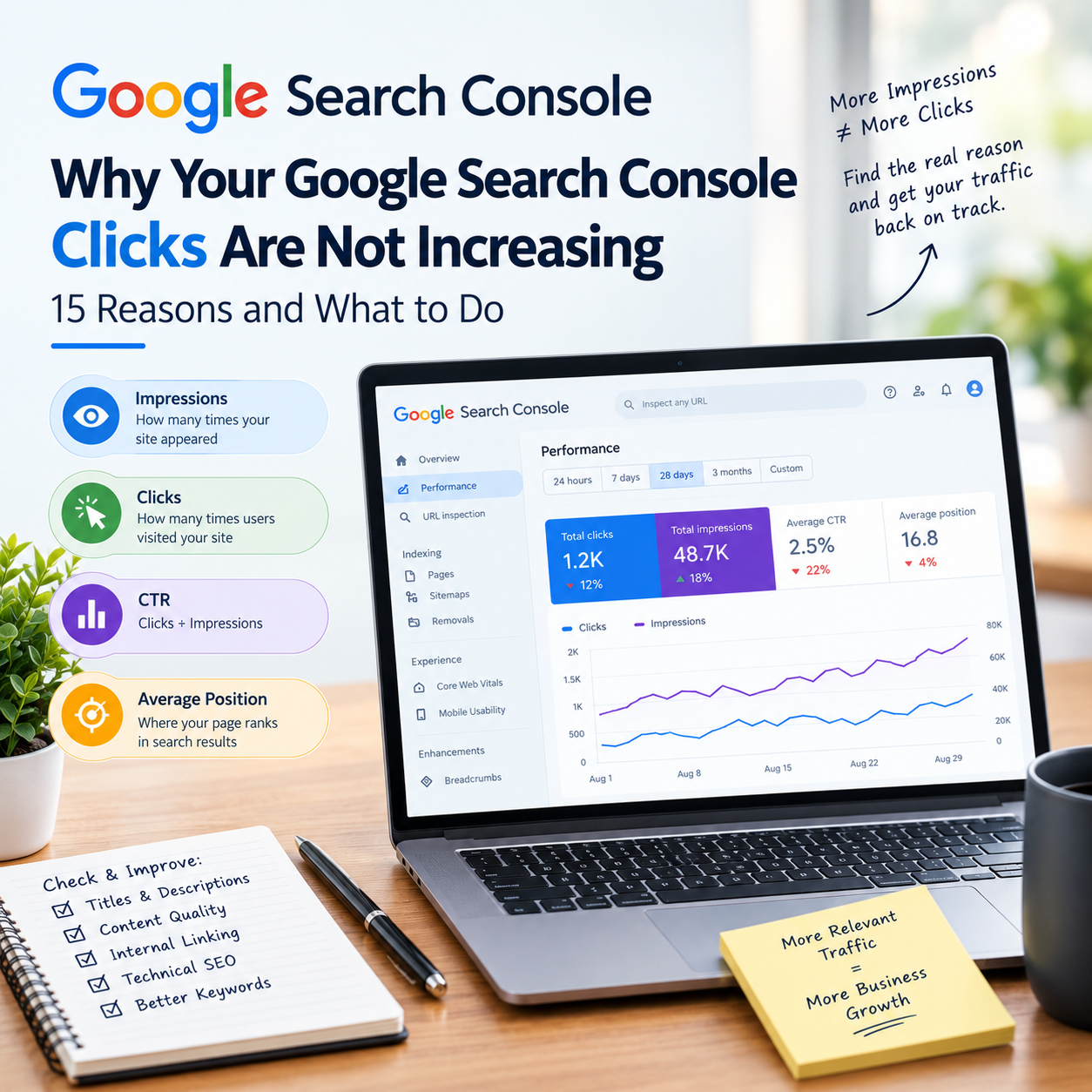
Why Your Google Search Console Clicks Are Not Increasing: 15 Reasons and What to Do
Imagine this situation: You log into Google Search Console for your small business website. You look at the Performance report, and at first glance, things look promising. The graph is moving upward. Impressions are growing week by week, and more of your pages are appearing in search results.
Then you look at the clicks column.
The numbers are practically flat.
If this has happened to you, it can feel genuinely frustrating. As a business owner, you invest time, effort, and budget into your website. Seeing your brand appear on Google feels like progress, but if those impressions do not turn into website visitors, inquiries, or phone calls, visibility alone does not pay the bills.
In this guide, we are going to look closely at why your Google Search Console clicks are not increasing, how to diagnose the root cause, and what practical steps you can take to turn impressions into actual traffic.
1. Introduction: Understanding Impressions, Clicks, CTR, and Average Position
Before looking at specific reasons, let us clear up what these metrics actually mean. Many website owners confuse search visibility with traffic generation.
Impressions: This counts how many times a user saw a link to your website on a Google search results page. If your page appears at the bottom of page two and a user scrolls past it, that still counts as an impression.
Clicks: This counts how many times a user actually clicked your link and landed on your website.
CTR (Click-Through Rate): This is the percentage of impressions that resulted in a click (Calculated as Clicks divided by Impressions). If your page gets 1,000 impressions and 10 clicks, your CTR is 1%.
Average Position: This indicates your typical ranking position for a query or page. Position 1 is the top result, while position 15 is near the middle of page two.
A Simple Reality Check
Suppose your blog post about “local accounting software” appears in search results 10,000 times in a month, but it sits at an average position of 14. Because it is buried on page two, almost nobody scrolls down to click it. You end up with 10,000 impressions, but only 5 clicks.
Your search visibility is high, but your actual traffic is nearly zero.
2. Why Google Search Console Clicks Are Not Increasing
There is rarely a single culprit when organic traffic stalls. The issue could stem from poor keyword alignment, weak title tags, low rankings, or deep-seated technical hurdles. Let us explore the 15 most common reasons.
Reason 1: Your Pages Are Ranking for Low-Click Queries
Sometimes your content ranks well, but the search queries themselves have low commercial intent. If users are searching for broad informational definitions or quick facts, they often find what they need right on the search results page via featured snippets, knowledge panels, or instant answers. They have no reason to click through to your website.
Reason 2: Your Impressions Are Increasing but Your Average Position Is Too Low
An increase in impressions often means Google is testing your pages for a wider set of keywords. However, if those pages are hovering between positions 8 and 20, they are stuck on the lower half of page one or deep on page two. The vast majority of search clicks go to the top three positions. Until you break into the top five, impression growth will rarely translate into click growth.
Reason 3: Your Search Result Title Is Not Compelling
Your title tag is your digital storefront sign. If your title is generic, purely technical, or cuts off mid-sentence, users will scroll right past it to a competitor who clearly addresses their immediate need.
Weak Example:
Best Accounting Tips for Small Businesses in India - Soft Brim Media BlogImproved Example:
7 Practical Tax Saving Tips for Small Businesses in India
Reason 4: Your Meta Description Does Not Match Search Intent
While meta descriptions are not a direct ranking factor, they act as ad copy for your organic listing. If your description fails to reassure the user that your page holds the exact answer they need, your CTR will remain depressed, even if your ranking is decent.
Reason 5: You Are Targeting Keywords That Do Not Match Your Page
Search intent governs modern SEO. If a user is searching with commercial intent (e.g., “hire local digital marketing agency”) and your page offers a high-level educational guide (“what is digital marketing”), the mismatch will cause visitors to bounce immediately, and Google will eventually stop sending traffic to that page for that query.
Reason 6: Your Content Is Too Generic
If your article simply mirrors the top five results already on Google without adding any fresh perspective, original research, local insights, or practical case studies, users have no incentive to engage with it. Google’s algorithms favor content that demonstrates authentic expertise and genuinely helps the user. Relying heavily on generic AI-generated content often results in pages that get indexed but fail to earn meaningful clicks or engagement.
Reason 7: Your Page Is Ranking for Unexpected Queries
Open your Search Console Performance report and look at the queries tab. You will likely see dozens of search terms you never intentionally targeted. While some might be useful, many will be completely irrelevant variations that generate impressions from users who bounce instantly because your page does not actually solve their problem.
Reason 8: Your Website Has Weak Internal Linking
Internal links act as the roadmap for your website. If your most important commercial and informational pages are isolated with no links pointing to them from other relevant pages, search engines struggle to understand their importance, and users struggle to navigate to them.
Reason 9: Your Pages Are Competing With Each Other
Keyword cannibalization occurs when multiple pages on your website target the same core keywords. Instead of strengthening your domain authority, your pages end up splitting search signals, confusing Google about which page deserves to rank, and diluting your overall click potential.
Reason 10: Your Content Is Outdated
If your articles feature outdated statistics, obsolete software interfaces, old pricing models, or outdated regulatory guidelines, users will quickly realize the information is stale. Keeping content relevant and accurate builds long-term trust and sustained traffic.
Reason 11: Your Website Has Technical SEO Problems
While content and intent drive rankings, technical roadblocks can stall growth entirely. Issues like accidental noindex tags, broken canonical tags, blocked crawling via robots.txt, slow mobile page speed, or poor Core Web Vitals can prevent Google from properly crawling, indexing, or ranking your pages.
Reason 12: Your Search Snippet Is Being Rewritten
Google frequently rewrites title tags and meta descriptions if it believes its automated version better matches the user’s specific query. If your original titles are bloated with keywords, Google may replace them with text pulled from your page body, which might not be optimized for high CTR.
Reason 13: Your Competitors Have Better Search Results
SERP competition is fierce. If your competitors have stronger brand recognition, higher review counts, better-optimized snippets, or more engaging page layouts, searchers will naturally gravitate toward their listings over yours, even if you share the same page.
Reason 14: You Are Publishing More Content Instead of Improving Existing Pages
Many business owners believe that publishing 50 new, thin blog posts will automatically fix traffic stagnation. In reality, strengthening, updating, and expanding 10 core pages that already have baseline impressions is often much faster and more effective than starting from scratch.
Reason 15: Your Data Checking Frequency Is Too High
SEO is a cumulative, long-term channel. Daily traffic fluctuations caused by weekend shifts, algorithm tests, or seasonal trends are completely normal. Reacting to every single dip or flat day in Search Console will only lead to counterproductive changes.
3. Impressions vs. Clicks: The Difference Every Website Owner Should Understand
To make sense of your Search Console data, keep this reference table handy:
| Metric | What it means | What to look for |
| Impressions | How often your site appeared in search results | Growing impressions indicate expanding keyword visibility and indexing. |
| Clicks | How many times users actually visited your site from search | Stagnant clicks mean visibility isn’t converting into user action. |
| CTR | The percentage of impressions that turn into clicks | A low CTR (below 1-2%) usually points to poor titles, low rankings, or bad intent match. |
| Average Position | Your typical ranking tier across tracked queries | Positions 1-3 capture the majority of clicks; positions 10+ generate minimal traffic. |
4. How to Find the Real Problem in Google Search Console
To diagnose why your traffic is flat, follow this systematic review process inside Google Search Console:
Open Performance > Search Results: Navigate to the main performance report.
Select a Meaningful Date Range: Change the default 3-month view to Last 6 Months or Year-over-Year to spot genuine macro trends rather than weekly noise.
Compare with the Previous Period: Turn on the comparison feature to view percentage changes in clicks, impressions, and CTR.
Review Queries and Pages: Sort your queries and pages by Impressions in descending order.
Identify the Mismatch: Look for pages with high impressions (e.g., over 2,000) but very low clicks (e.g., under 20). These represent your immediate optimization opportunities.
5. How to Diagnose Your Website Using Four Common Scenarios
Scenario A: High Impressions + Low CTR. Your pages are visible, but users aren’t compelled to click. Fix your title tags, meta descriptions, and check if you are ranking for the wrong intent.
Scenario B: Low Impressions + Low Clicks. Your site lacks visibility. Focus on keyword targeting, expanding content depth, and resolving indexing or technical roadblocks.
Scenario C: Good Rankings + Low CTR. You are sitting in the top five positions, but traffic is poor. Examine your search snippet, look out for intrusive SERP features (like ads or knowledge panels pushing you down), and refine your messaging.
Scenario D: Clicks Increasing Very Slowly Despite Publishing Regularly. You may be spreading your authority too thin across low-quality pages. Consolidate weaker content, build robust internal links, and strengthen topical authority.
6. How to Increase Google Search Console Clicks
Once you pinpoint where the bottlenecks lie, apply these practical strategies to drive real growth:
Craft Compelling, Benefit-Driven Titles: Make your titles clear, concise, and focused on the exact solution the searcher needs.
Align Content with Search Intent: Ensure your headings and paragraphs directly answer the user’s primary question within the first few paragraphs.
Refresh Underperforming Pages: Update old statistics, add fresh local examples, and expand thin sections of your existing articles.
Strengthen Internal Linking: Create logical content clusters and link your high-traffic pages to relevant service and product pages.
Target Realistic Long-Tail Keywords: Instead of fighting enterprise giants for broad terms, focus on specific, high-intent phrases relevant to your local market.
7. What NOT to Do When Clicks Are Not Increasing
Do not stuff keywords: Forcing unnatural phrases into your text hurts readability and alienates readers.
Do not publish hundreds of low-quality articles: Volume without quality wastes crawl budget and damages your overall site authority.
Do not change URLs unnecessarily: Altering established URLs without proper 301 redirects breaks existing rankings and erases momentum.
Do not buy cheap, spammy backlinks: Low-quality link building can trigger algorithmic or manual penalties from Google.
Do not delete pages impulsively: Simply removing pages with low traffic can disrupt internal linking and valuable long-tail queries.
8. How Long Does It Take for Google Search Clicks to Increase?
There is no universal timeline in SEO. Sustainable organic growth depends on your website’s history, industry competition, technical health, content quality, and the frequency of search demand. While minor title tweaks can sometimes improve CTR within a couple of weeks, meaningful increases in rankings and traffic typically require 3 to 6 months of consistent, strategic optimization.
9. A Practical 30-Day Google Search Console Improvement Plan
Use this structured four-week roadmap to tackle your stagnant clicks methodically:
Week 1: Audit your Search Console data. Identify your top 10 pages with high impressions and low CTR.
Week 2: Rewrite uncompelling title tags and meta descriptions for those target pages. Ensure the content accurately matches search intent.
Week 3: Audit internal links. Connect your newly optimized pages to other relevant blog posts and core service pages across your site.
Week 4: Monitor changes in CTR, rankings, and clicks. Review your progress and adjust your approach based on real performance data.
10. Frequently Asked Questions
Why are my Google Search Console clicks not increasing?
Clicks stall when impressions are generated by low-ranking positions, low-intent queries, or unappealing search snippets that fail to attract clicks.
Why do I have impressions but no clicks?
This usually means your pages are appearing in search results (often on the lower half of page one or on page two), but users are choosing competing results instead.
Is a low CTR always a problem?
Not always. Informational queries naturally have lower CTRs than brand-specific or transactional searches, but a consistently low CTR across key commercial pages signals an optimization issue.
How can I increase clicks without increasing impressions?
By improving your click-through rate on existing impressions through better title tags, stronger meta descriptions, and capturing higher ranking positions.
How long does it take for Google Search traffic to increase?
Most meaningful SEO improvements take between 3 to 6 months to mature, depending on competition and site authority.
Should I publish more blogs if clicks are not increasing?
Not necessarily. It is often far more effective to optimize and update your existing content before investing time in new articles.
Why is my page indexed but not getting clicks?
An indexed page will not get clicks if it ranks too low in search results or if the query it targets has extremely low search volume.
Can changing the title increase CTR?
Yes. Clear, compelling, and intent-focused title tags often produce noticeable improvements in click-through rates within a short window.
Does Google Search Console show all website traffic?
No. Search Console exclusively tracks organic traffic originating from Google Search. It does not include direct traffic, social media visits, paid ads, or referrals.
How often should I check Google Search Console?
Checking your data once a week or bi-weekly is ideal. Reviewing metrics daily can lead to unnecessary reactions against normal day-to-day fluctuations.
11. Conclusion
Staring at flat click numbers in Google Search Console can feel disheartening, but it is also an opportunity. Impressions prove that Google knows your website exists and is testing your pages. The missing link is conversion—turning those passive impressions into active, engaged visitors.
By focusing on search intent, refining your titles, updating underperforming content, and addressing technical roadblocks, you can bridge the gap between visibility and real traffic.
At Soft Brim Media, we help small businesses and local enterprises across India cut through the noise, build sustainable organic visibility, and turn search traffic into measurable business growth. If you need a clear, practical SEO strategy tailored to your business, get in touch with our team today.
Final SEO Elements
SEO Title: Why Your Google Search Console Clicks Are Not Increasing: 15 Reasons and What to Do
Meta Title: Why GSC Clicks Are Not Increasing: 15 Reasons & Fixes
Meta Description: Impressions increasing but traffic flat? Discover 15 practical reasons why your Google Search Console clicks are stuck and how to fix them.
Primary Keyword: Google Search Console clicks not increasing
Secondary Keywords: Google Search Console impressions but no clicks, why website clicks are not increasing, Google Search Console low clicks, Google Search Console CTR, website impressions but no clicks, how to increase Google Search clicks
Suggested URL Slug:
/google-search-console-clicks-not-increasing/Suggested Featured Image Text: Why Are Your Google Search Console Clicks Stuck? 15 Reasons & Solutions
Image ALT Text: A business owner analyzing flat Google Search Console performance data on a laptop
5 Internal-Link Suggestions:
Link 1: Soft Brim Media’s Guide to Local SEO for Small Businesses (Anchor text: local SEO strategy) — Place in Section 6 under local market targeting.
Link 2: Understanding Technical SEO: A Checklist for Indian Businesses (Anchor text: technical SEO roadblocks) — Place in Section 2 under Reason 11.
Link 3: Content Marketing vs. SEO: What Small Businesses Need to Know (Anchor text: content marketing and SEO) — Place in Section 8 under content quality.
Link 4: How to Conduct a Content Audit for Your Website (Anchor text: content audit) — Place in Section 4 during the review process.
Link 5: Soft Brim Media Digital Marketing Services (Anchor text: digital marketing services) — Place in the concluding CTA paragraph.
5 Related Future Blog Topics:
How to Find Hidden Keyword Opportunities in Google Search Console
The Complete Guide to Improving Your Organic Click-Through Rate (CTR)
Keyword Cannibalization: What It Is and How to Fix It on Your Business Website
How to Audit Your Small Business Website for Technical SEO Errors
Why Publishing More Blog Posts Isn’t Fixing Your SEO (And What to Do Instead)