WordPress powers over 40% of websites worldwide. But because of its popularity, it also becomes a major target for hackers. If you are running a business website, blog, or eCommerce store, security should be your top priority.
In this detailed guide, you’ll learn how to secure WordPress website from hackers, prevent malware attacks, and protect your data step-by-step.
Why WordPress Websites Get Hacked?
Before fixing the problem, it’s important to understand the common reasons:
Weak passwords
Outdated themes and plugins
Poor hosting security
No SSL certificate
No firewall protection
Using nulled themes or plugins
No regular backups
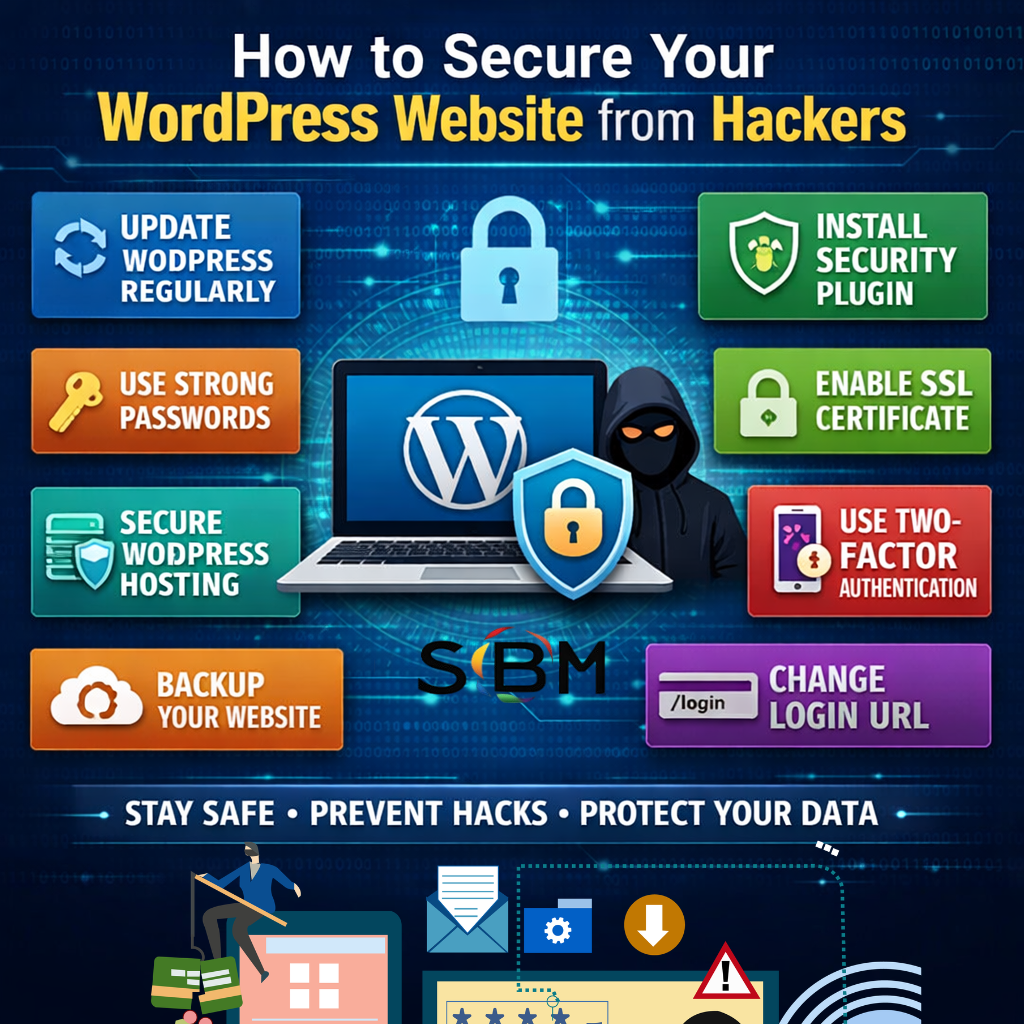 Most hacks happen because of negligence, not because WordPress itself is unsafe.
Keep WordPress Core Updated
The core software regularly releases security patches and improvements.
Why Updates Matter
Fix known vulnerabilities
Improve performance
Patch security loopholes
Go to Dashboard → Updates and update:
WordPress version
Themes
Plugins
Never ignore update notifications.
Use Strong Login Credentials
Weak usernames like “admin” and simple passwords are easy targets for brute-force attacks.
Best Practices
Use complex passwords (12+ characters)
Add symbols, numbers, and uppercase letters
Avoid common usernames
Use a password manager
You can also limit login attempts to prevent repeated failed logins.
Install a WordPress Security Plugin
A security plugin adds firewall protection, malware scanning, and login security.
Popular security plugins include:
Wordfence
Sucuri
iThemes Security
These tools help in blocking malicious traffic, detecting file changes, scanning malware, and enabling two-factor authentication.
Enable SSL Certificate (HTTPS)
SSL encrypts data between users and your server. It also improves trust and SEO rankings.
Most hosting providers offer free SSL certificates through:
Let’s Encrypt
You can enable it easily from your hosting control panel.
Choose Secure WordPress Hosting
Cheap hosting often lacks strong security measures. Secure hosting acts as your first line of defense.
Look for hosting that provides:
Malware scanning
Firewall protection
Daily backups
DDoS protection
Trusted hosting providers include:
SiteGround
Bluehost
Kinsta
Disable File Editing from Dashboard
Hackers can inject malicious code if they gain dashboard access.
Add this code to your wp-config.php file:
This disables theme and plugin file editing from the admin panel.
Change WordPress Login URL
The default login URL is:
yourwebsite.com/wp-admin
Changing it reduces automated bot attacks. You can use a plugin like WPS Hide Login to customize the login URL.
Use Two-Factor Authentication (2FA)
Two-factor authentication adds an extra security layer. Even if your password is compromised, hackers cannot log in without a verification code.
Most security plugins offer built-in 2FA options.
Regular Website Backups
If your site gets hacked, backups can save your business.
Use reliable backup plugins and schedule automatic backups. For business websites, daily backups are recommended. For blogs, weekly backups may be sufficient.
Store backups securely on cloud services like Google Drive or Dropbox instead of only on your server.
Protect wp-config.php File
The wp-config.php file contains sensitive database credentials.
Add the following code to your .htaccess file:
This blocks unauthorized access.
Disable XML-RPC If Not Required
XML-RPC can be exploited for brute-force and DDoS attacks.
Disable it if you are not using features like the WordPress mobile app or Jetpack.
Scan Website Regularly for Malware
Regular scanning helps detect malware injections, spam links, and blacklisting issues.
You can use tools like Sucuri SiteCheck or Google Safe Browsing to monitor your website’s security status.
Avoid Nulled Themes and Plugins
Never download premium themes or plugins from unofficial sources. Nulled software often contains hidden malware, backdoors, or spam scripts.
Always purchase from trusted marketplaces such as WordPress.org or ThemeForest.
Limit User Roles and Permissions
Not every team member needs administrator access.
Assign appropriate roles such as Administrator, Editor, Author, or Subscriber. Remove inactive users to reduce security risks.
Hide WordPress Version
Hackers sometimes target known vulnerabilities in specific versions.
Add this code in your theme’s functions.php file:
Advanced WordPress Security Tips
For higher-level protection:
Enable a Web Application Firewall (WAF)
Use Cloudflare DNS
Activate server-level firewall
Monitor server logs regularly
Implement Content Security Policy
What to Do If Your WordPress Site Gets Hacked
Disconnect the site from the internet, scan for malware, restore from a clean backup, change all passwords, and contact your hosting provider immediately. After cleaning, request a review in Google Search Console if your site was blacklisted.
Conclusion
Securing your WordPress website is not a one-time task. It is an ongoing process that requires attention and regular maintenance.
By implementing these security measures, you can prevent hacking attempts, protect user data, improve SEO rankings, and build long-term trust with visitors.
If you want, I can now create SEO meta title, meta description, focus keywords, excerpt, and caption for this blog.